
Download EasyHosts Lite – Hosts File Manager, Developer Tool, DNS Configuration
Overview
EasyHosts Lite is a specialized mobile utility designed to simplify the management of the hosts file on Android devices. The app targets developers—both front-end and back-end—who frequently need to manipulate local DNS mappings for testing, development, or research purposes. By streamlining the process of editing and switching between multiple hosts configurations, EasyHosts Lite eliminates the manual, error-prone steps traditionally associated with host file modifications.
For developers working on local environments, staging servers, or domain-specific testing, the app provides a reliable method to redirect traffic without relying on external DNS services. This is particularly useful during cross-device development, team collaboration, or when simulating production environments. The app also supports academic research scenarios where controlled network behavior is required.
The developer did not provide additional technical details about the organization or background. However, the app’s focus on efficiency, minimalism, and functionality suggests a targeted approach to solving a niche but critical workflow challenge. In the broader app ecosystem, EasyHosts Lite fills a gap for lightweight, mobile-accessible tools that support developer productivity on the go.
Key Features & Functionality
- Minimalist Design: The app’s interface is intentionally simple, reducing visual clutter and ensuring low system resource consumption. This design choice allows developers to use the app without performance degradation, even on lower-end devices.
- Unlimited Hosts Entries: Unlike many host management tools that impose entry limits, EasyHosts Lite supports an unlimited number of host entries. This enables users to manage complex testing environments, simulate multiple domains, or handle large-scale local DNS configurations.
- One-Click Switching: Users can enable or disable entire hosts configurations with a single tap or double-click. This feature accelerates workflow transitions between development, staging, and production-like environments, minimizing downtime.
- Seamless Sharing: The app includes an import/export function that allows users to save and transfer their host configurations. This is ideal for sharing setups between team members or syncing configurations across multiple devices via cloud storage.
For example, a developer testing a multi-domain web application can create a custom hosts file with all required local domains, save it as a configuration, and switch between it and a production-safe setup with one action. Similarly, a team can share a standardized hosts file to ensure consistent local environments across all members.
Interface, UX & Performance
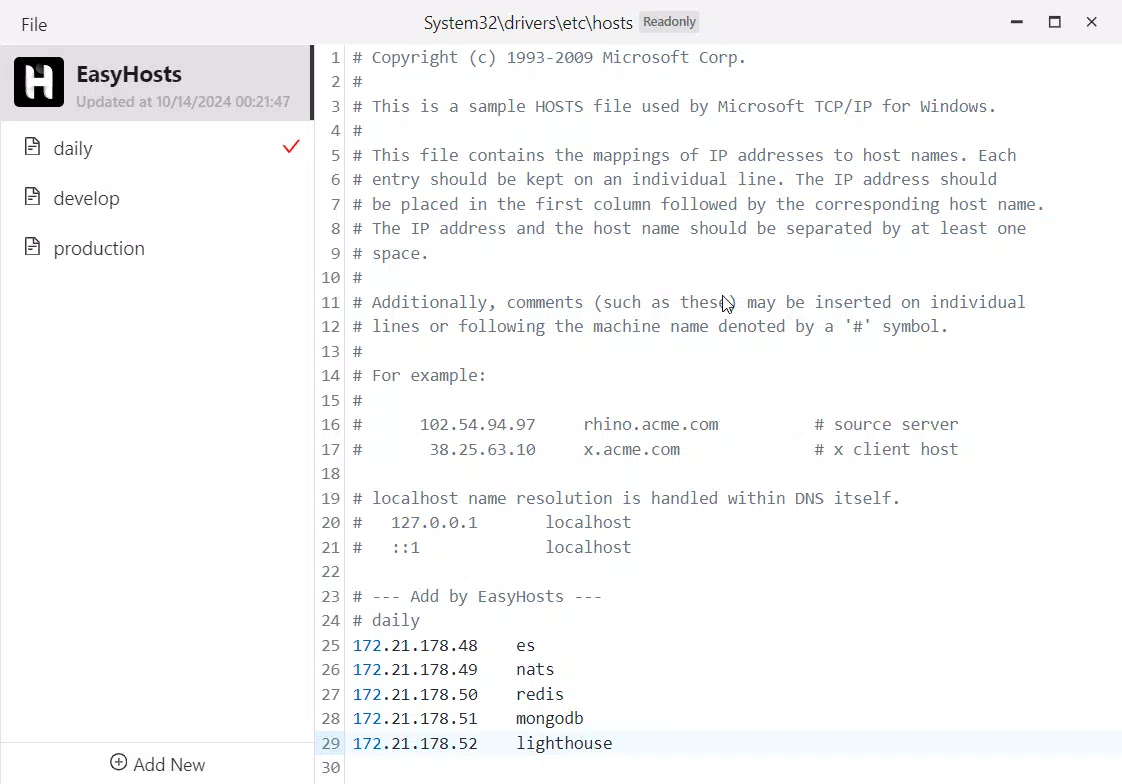
EasyHosts Lite features a clean, minimal interface that prioritizes usability and speed. The layout is optimized for touch navigation, with clearly labeled buttons and intuitive organization of configurations. Users can view, select, and activate hosts files without unnecessary steps.
Navigation is straightforward: users access their saved configurations from a central list, and switching between them is instantaneous. The app maintains responsiveness across different device categories, though specific performance benchmarks were not disclosed by the developer.
Although the developer did not list formal performance metrics, the app’s lightweight nature suggests it operates efficiently even on devices with limited RAM or processing power. Stability appears consistent based on its core functionality—managing static text files without requiring constant background processes.
Platform Compatibility & Technical Requirements
EasyHosts Lite is available for Android devices. The app’s minimum OS requirements were not specified by the developer. The current version is listed as 1.0.0, and the file size is 1.2 MB.
Compatibility information was not fully disclosed. Users are advised to ensure their device meets general Android system requirements for running third-party apps. The app does not require root access, making it accessible to a broad range of users.
Pros and Cons
Pros
- Lightweight design with minimal system resource usage
- Supports unlimited hosts entries for flexible configuration
- One-click switching between configurations improves workflow efficiency
- Import/export functionality enables easy sharing and backup
- Designed for developers and technical users without unnecessary bloat
Cons
- Developer did not provide detailed system requirements or compatibility list
- No in-app update notifications or version tracking
- Interface lacks advanced customization options
- Not available on iOS or other platforms
- No built-in backup or cloud sync beyond manual export
FAQ
Is EasyHosts Lite safe to use?
The app functions by modifying the hosts file on Android, which is a standard system file. It does not require root access, reducing security risks. However, users should only edit the hosts file using trusted configurations to avoid connectivity issues.
Can I use EasyHosts Lite without root access?
Yes. The app is designed to work without root privileges, allowing users to manage hosts files through standard Android file system access.
Is EasyHosts Lite available on iOS?
The app is currently only available for Android. There is no official iOS version at this time.
How do I share my hosts configuration?
Use the built-in import/export feature. Save your configuration as a file, then transfer it via cloud storage, email, or direct file sharing to another device.
Does the app support automatic updates?
Automatic update functionality was not specified. Users should check the app store for new versions manually.
Final Thoughts
EasyHosts Lite delivers a focused, efficient solution for developers who need reliable hosts file management on mobile devices. Its minimalist design, unlimited entry support, and one-click switching make it a valuable addition to any developer’s toolkit. While it lacks advanced features like automatic syncing or cloud integration, its core functionality is robust and well-executed.
For front-end and back-end developers, testers, and researchers working with local environments, this app enhances productivity by simplifying a traditionally cumbersome task. Its low file size and minimal resource consumption ensure it runs smoothly across a wide range of Android devices.
Download EasyHosts Lite now


